Present 3D OTO Review: Turn Any Idea Into Stunning 3D Presentations With Talking AI Avatars
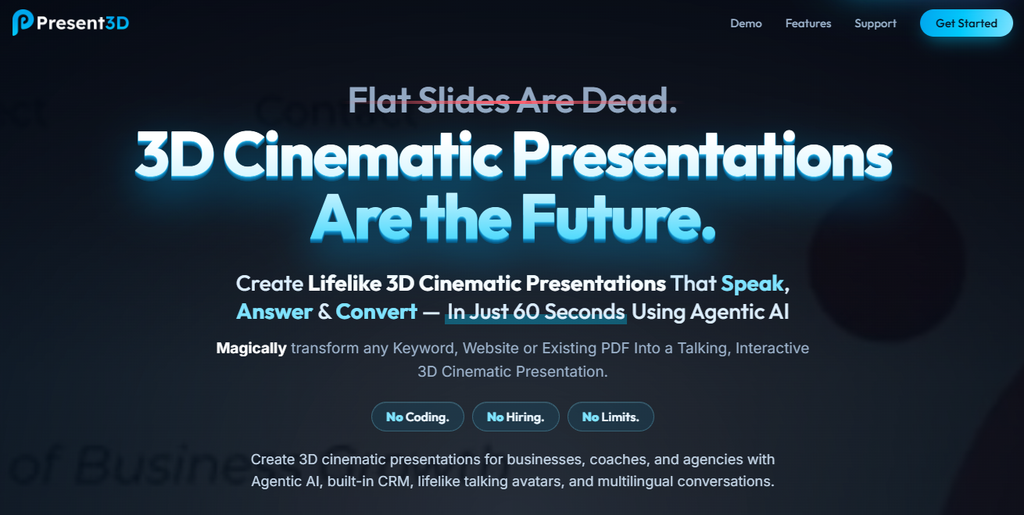
Have you ever spent hours creating a presentation, only to end up with boring slides that barely hold anyone’s attention?
Designing professional slides takes time, hiring someone can get expensive, and traditional presentations often struggle to keep viewers engaged. Even worse, potential customers may leave with unanswered questions, costing you valuable sales opportunities.
Now, you can create a stunning 3D cinematic presentation in minutes, complete with a lifelike AI presenter that speaks, interacts with viewers, and helps capture leads, all without complicated technical work.
In this Present 3D review, I’ll walk you through its features, show you how it works, explore the pricing and upgrades, and share my thoughts on its overall value.
Keep reading to discover what Present 3D can do and whether it’s the right tool for your needs.
- Present 3D Review – Quick Overview
- The Concept of Present 3D
- Meet the Vendors
- Everything You Need to Create, Engage & Convert
- About Usage Instructions and My Opinion
- How to Use Present 3D The Step-by-step Walkthrough
- What Do I Think After Experiencing Present 3D?
- The Pricing Information
- FE Present 3D Pricing
- The All-in-One Present 3D BundleDeal
- Present 3D Review – Available OTO Options
- Should You Become a Present 3D User?
- What I Like About Present 3D and What to Keep in Mind
- Is Present 3D Worth Getting? My Conclusion
- 10 Common Questions Answered
- Read related products
Present 3D Review – Quick Overview
| Creator | Dr. Amit Pareek & Atul Pareek. |
| Product | Present 3D Software |
| The official page | >>Click here to access |
| Front-end price | $27 – $37 (one-time payment) |
| Coupon | Add my code BLACK10 to get $10 off. |
| All-in-one Present 3D Bundle | YES. Click Here To Access This Bundle Deal |
| The Bundle’s price | $267 (one-time payment) – After adding my discount code. |
| Discount code for the Bundle | Use my code BLACKFRIDAY to get $230 off the Present 3D Bundle. |
| Bonus | Yes, Huge Bonus |
| Guarantee | 30-day money-back guarantee! |
| Support | Vendor Support: https://support.oppyo.com/support/home |
What is Present 3D?
Present 3D OTO is an AI-powered software that helps anyone create professional, interactive 3D cinematic presentations in just minutes.
Enter a keyword, paste a website URL, or upload a PDF, and the software transforms your content into an engaging presentation with lifelike AI avatars that speak, explain information, answer questions, and interact with viewers in real time.
It also helps businesses capture leads, engage potential customers, and drive more sales without requiring technical or design skills.
You can use Present 3D to promote your own products, attract leads, and increase sales conversions. Better yet, you can start offering AI-powered 3D presentation creation services to businesses, coaches, marketers, and agencies.
Meet the Vendors
Dr. Amit Pareek and Atul Pareek lead Present 3D, a software development and digital marketing duo with years of experience launching AI-powered business solutions.
They’ve introduced products such as ClawBooks AI, Agent Jarvis AI, Snap Apps AI, and Prezent IQ, building a portfolio that covers AI content creation, business automation, and digital presentation technology.
Present 3D combines several areas they’re already familiar with, especially presentation creation, AI-powered communication, and marketing automation.
Everything You Need to Create, Engage & Convert
Check out some examples below created with Present 3D:
Present 3D brings together AI-powered presentation creation, lifelike virtual presenters, interactive communication, and lead generation in one easy-to-use platform.
Here are the powerful features that make it a useful tool for people looking to turn ordinary presentations into engaging experiences:
✅ Turn Any Idea Into a Stunning 3D Presentation in Minutes.
Have an idea but don’t know where to start? Simply enter a prompt, paste a website URL, or upload an existing PDF.
Present 3D automatically generates a cinematic presentation with professionally designed slides, visuals, and content, saving you hours of manual work.
✅ Bring Your Presentations to Life With AI Avatars.
Give your presentations a realistic virtual presenter that speaks and explains your content.
Choose from a wide selection of AI avatars and natural-sounding voices, or personalize the experience with your own appearance and voice to connect with your audience.
✅ Let Your AI Presenter Pause, Answer & Continue.
Your presentation can do more than deliver a prepared message. When viewers have questions, the AI presenter can pause, respond in real time, and continue the presentation, keeping the experience natural and engaging without requiring you to be there.
✅ Turn One-Way Slides Into Interactive Conversations.
Keep your audience involved with built-in AI chat and interactive communication. Viewers can ask questions, get helpful responses, and explore your content at their own pace, making it easier to understand your message and take action.
✅ Combine Multiple Presentations Into One Cinematic Experience.
Have several presentations to share?
Present 3D lets you organize and combine them into a seamless presentation playlist, also known as a Super Presentation.
It’s especially useful for product showcases, training programs, business proposals, and multi-part presentations.
✅ Share Your Presentations Anywhere With Ease.
Reach your audience wherever they are. Share your presentations through direct links, embed them on websites or landing pages, or generate QR codes for instant access. This makes it easy to promote your content across multiple marketing channels.
✅ Create Professional 3D Presentations Without Design Skills.
You don’t need to hire designers or master complicated software to produce impressive results.
Present 3D offers AI-generated visuals, customizable layouts, and a drag-and-drop editor, helping beginners create polished presentations without getting bogged down in the technical side.
✅ Download, Export & Reuse Your Content.
Get more value from every presentation you create. Export your slides as PDF or image files, download your content, and repurpose it for marketing materials, client proposals, educational resources, or other business activities.
✅ Capture Leads Automatically With the Built-In CRM.
Turn audience engagement into potential business opportunities. Present 3D includes lead capture forms and a built-in CRM that helps collect contact information, organize prospects, track interactions, and manage conversations for future follow-ups.
✅ Control Your Entire Presentation Business From One Dashboard.
Keep everything organized without switching between multiple tools. The central dashboard lets you create, customize, manage, and monitor presentations and leads from one place, making daily work easier.
✅ Work From Anywhere With Cloud-Based Access.
Present 3D runs entirely in the cloud, so there’s no complicated installation or hosting setup. Access your account, manage presentations, and handle projects from your desktop, laptop, tablet, or smartphone whenever you need to.
✅ Create Presentations for Clients & Make Money With Commercial Rights.
Present 3D also lets you turn your skills into a paid service. With the included commercial license, you can create customized 3D presentations for businesses, marketers, coaches, and other clients, opening the door to freelance projects or your own AI-powered presentation agency.
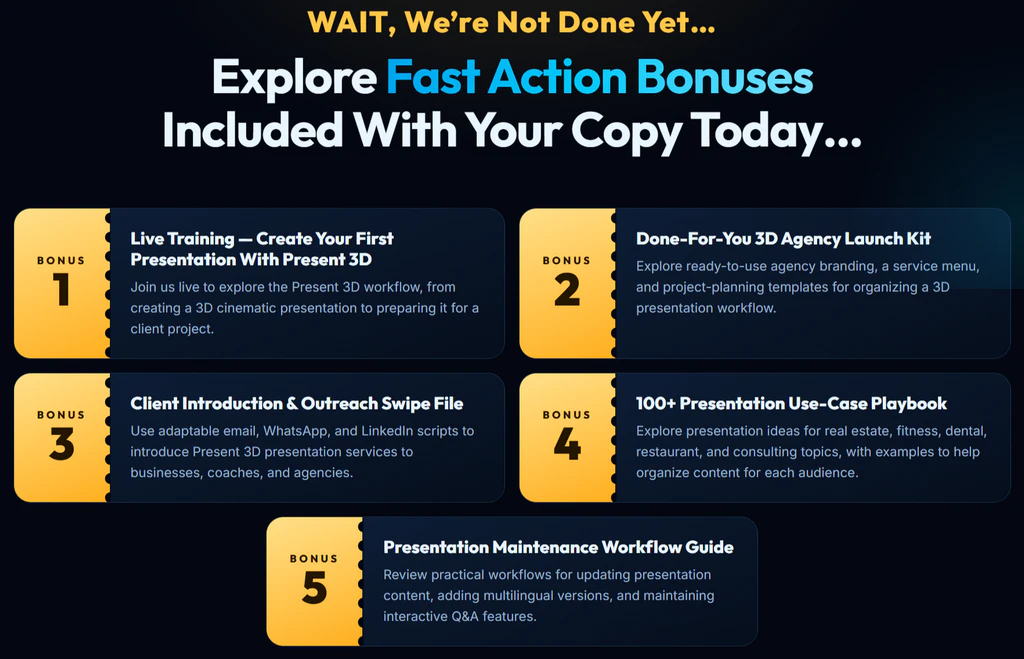
Purchase today and unlock these exclusive bonuses:
About Usage Instructions and My Opinion
How to Use Present 3D: The Step-by-step Walkthrough
Let’s get inside Present 3D and see what you can actually create with it! I’ll take you through the main workflow step by step to show you how to generate your presentation, personalize the content, bring in an AI presenter, and share the finished result:
[+] Open Your Dashboard:
Sign in to Present 3D and open the Dashboard.
Click Create presentation to start a new project, or choose a presentation style from the two cards below.
[+] Choose Your Presentation Style:
Select Cinematic Presentation for dramatic AI-powered slides, or 3D Presentation for slides with three-dimensional scenes and motion. Begin with the style that fits your content.
[+] Choose Your Content Source:
Under How do you want to create it?, select With AI, From a URL, or From a PDF. For the AI option, describe the topic in the large text box.
[+] Set Your Slide Preferences:
Choose the Number of slides, Language, and Tone.
Review the summary on the right, then click Generate presentation.
[+] Refine Your Slides With AI:
Review the slides in the editor. Type an instruction in the AI input, such as changing text size or colors, and submit it to update your presentation.
Use Undo to reverse this change if necessary.
[+] Customize Colors and Narration:
Open Settings and adjust Colors, Voice-over & captions, and the Thank-you slide. Select the options you want to include in the finished presentation.
[+] Add a Lead Capture Form:
In Settings, enable Lead Form.
Choose the information you want visitors to submit and click Save so the form can collect new prospects.
[+] Collect Viewer Feedback:
Turn on Audience feedback, choose a rating style, and click Save. Visitors can leave a rating or comment when they finish your presentation.
[+] Publish and Share Your Presentation:
Click Publish when your slides are ready.
Open Share to copy a public link, get an embed code, or download a QR code for easy access.
[+] Create a 3D Presentation:
Return to the Dashboard and choose 3D Presentation.
Enter your topic or choose a URL or PDF, set the slide options, and click Generate presentation.
[+] Preview the Finished 3D Slides:
Open Present to play through your 3D slides. Check how the scenes, transitions, text, and visual effects appear to your viewers.
[+] Connect an AI Presenter:
Go to Agent and select New agent. Choose the presentation your AI presenter should support, then continue through the agent setup.
[+] Choose an Avatar and Voice:
Pick an Avatar or upload an image, then select a Voice.
Use Listen to check the voice before moving to the next setting.
[+] Configure the AI Knowledge:
Open AI model & knowledge.
Choose an AI model and Response length, then configure the extra information your agent can use when answering questions.
[+] Add Welcome Messages and FAQs:
Use Messages & FAQs to write the opening and closing messages.
Click Add FAQ to supply common customer questions with helpful answers.
[+] Apply Branding and Live Hours:
Under Footer branding, add your logo and website link.
Set Live schedule days and hours so the AI presenter knows when to chat and when to collect contact details.
[+] Save and Test Your AI Presenter:
Click Save & publish to activate the agent.
Use the Live Preview chat to check its replies, then select Open presentation to view it alongside the slides.
[+] Let Visitors Ask Questions:
Open the published presentation and use the on-screen chat to ask a question. The AI presenter responds within the presentation, giving visitors a way to get answers while browsing.
[+] Manage Leads and Conversations:
Open CRM to review viewer conversations. Select a contact to read the discussion, check lead information, and update its status or follow-up details.
[+] Check Audience Ratings:
In the CRM Feedback area, review ratings and written comments. Use this information to see how your presentations are performing with visitors.
[+] Create a Master Presentation:
Open Master Presentation and choose Create Master Presentation. Add its name, description, and optional branding so visitors can browse several presentations from one page.
[+] Choose Your Master Layout:
Select a Layout for the master page. Check the preview to see how the presentation cards and content will appear together.
[+] Add Presentations to Your Master Page:
Under Select presentations, check the decks you want to include and arrange them in the desired order.
Click Save & publish when the collection is ready.
[+] Share Your Published Master Page:
Once your master page is live, click Open page to check its public view.
Use the Link, Embed, or QR code options to share the full collection.
What Do I Think After Experiencing Present 3D?
After exploring Present 3D, I’m impressed by how much this software can accomplish with such a straightforward workflow. Turning a simple idea, website, or PDF into a professional 3D presentation takes very little effort, and the customization options give you plenty of control over the final result.
What I particularly like is the interactive experience it creates for viewers. The lifelike AI presenters can explain your content, answer questions, and guide visitors through your message. This makes it especially useful for product demonstrations, customer education, and sales presentations where clear communication can make a real difference.
I also appreciate its practical marketing applications. You can turn existing content into engaging presentations, publish them across your marketing channels, and collect interested leads through the built-in CRM. For freelancers, the opportunity to create these presentations for paying clients adds another attractive dimension.
Overall, I see Present 3D as a valuable tool for both beginners and experienced marketers. It makes professional presentation creation more accessible while offering meaningful opportunities to improve customer engagement, support sales, and develop AI-powered services. That’s why I believe it’s a smart addition to your business toolkit.
The Pricing Information
FE: Present 3D Pricing
Getting started with Present 3D is affordable, with two plans available:
+ Personal ($17 One-Time):
Perfect for creating and customizing 3D presentations using the core AI tools.
+ Commercial ($27 One-Time):
Gives you everything in Personal, plus advanced AI presenters, interactive conversations, CRM, lead generation tools, and a commercial license.
See the full comparison image below:
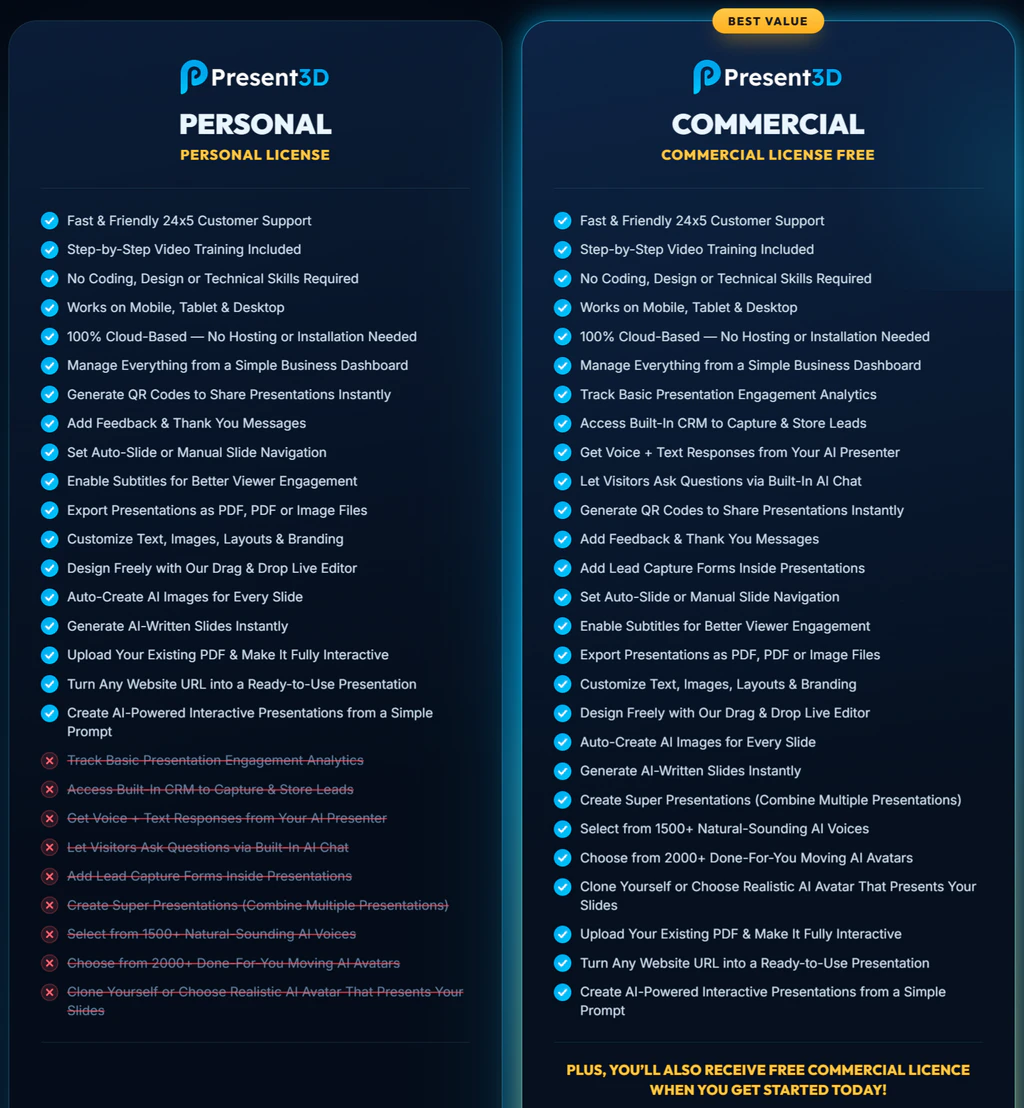
Personally, I’d go with Commercial. The additional $10 unlocks some of the software’s most useful capabilities, especially if you want to create presentations for business or paying clients.
You’ll also receive a 30-day money-back guarantee with either option.

Don’t miss the current offer! Choose your preferred plan and put it to work today!

Add my code BLACK10 to get $10 off.
The All-in-One Present 3D BundleDeal
The Present 3D Bundle is an all-in-one package that combines the front-end software with four powerful upgrades at a heavily discounted price.
It’s a great choice for anyone who wants advanced AI presentation creation, unlimited usage, smart automation, and agency tools without buying each upgrade separately.
Here’s what’s included in the bundle:
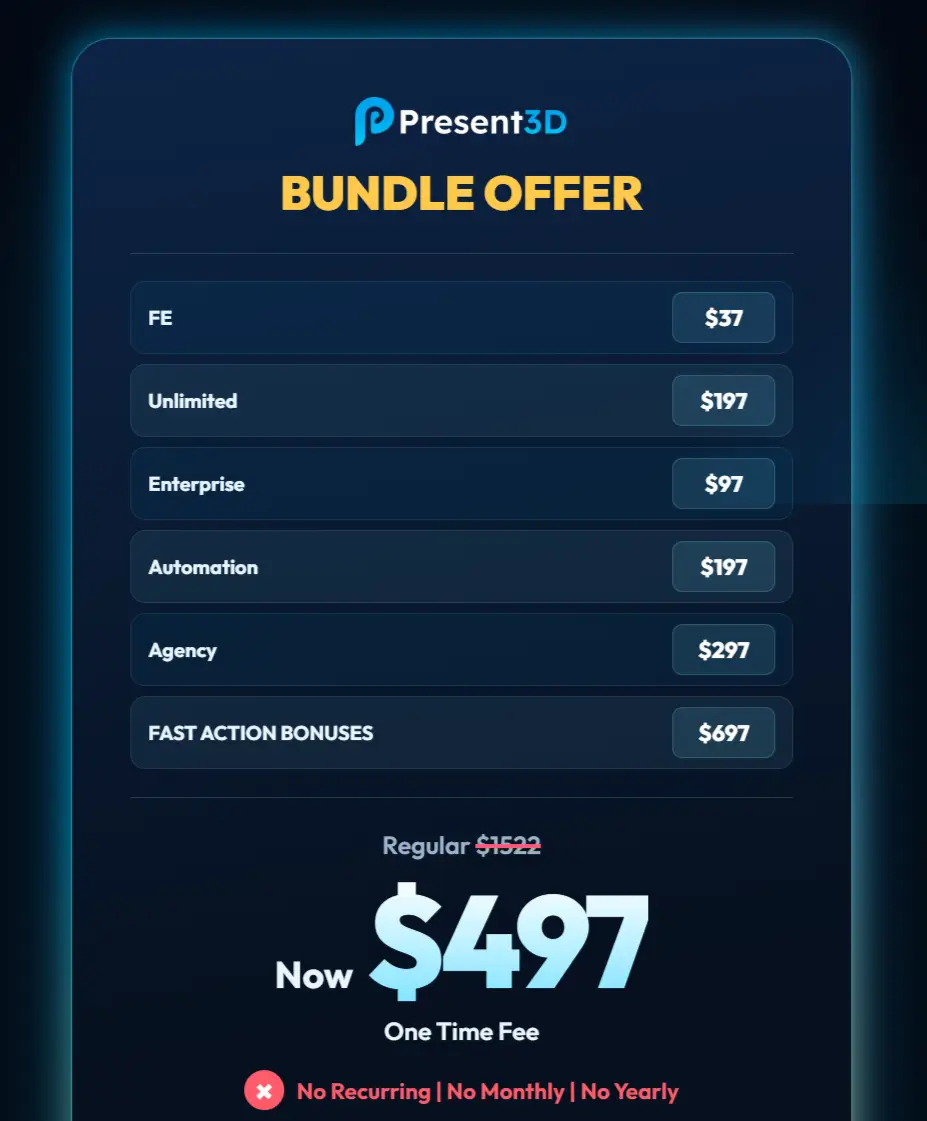
The regular bundle price is $367 one-time, but you can use coupon code BLACKFRIDAY to save an extra $230, bringing your total down to $267.
Use my code BLACKFRIDAY to get $230 off the Present 3D Bundle.
Present 3D Review – Available OTO Options
This launch offers five optional upgrades that give you access to more powerful features, higher usage limits, advanced automation, and additional business opportunities.
Here’s a quick overview of each upgrade and what it brings:
OTO 1: Present3D Unlimited Edition
Price: $77 (one-time payment)
>>>Click Here To Access This OTO
Take your presentation creation to the next level with expanded usage limits and greater flexibility.
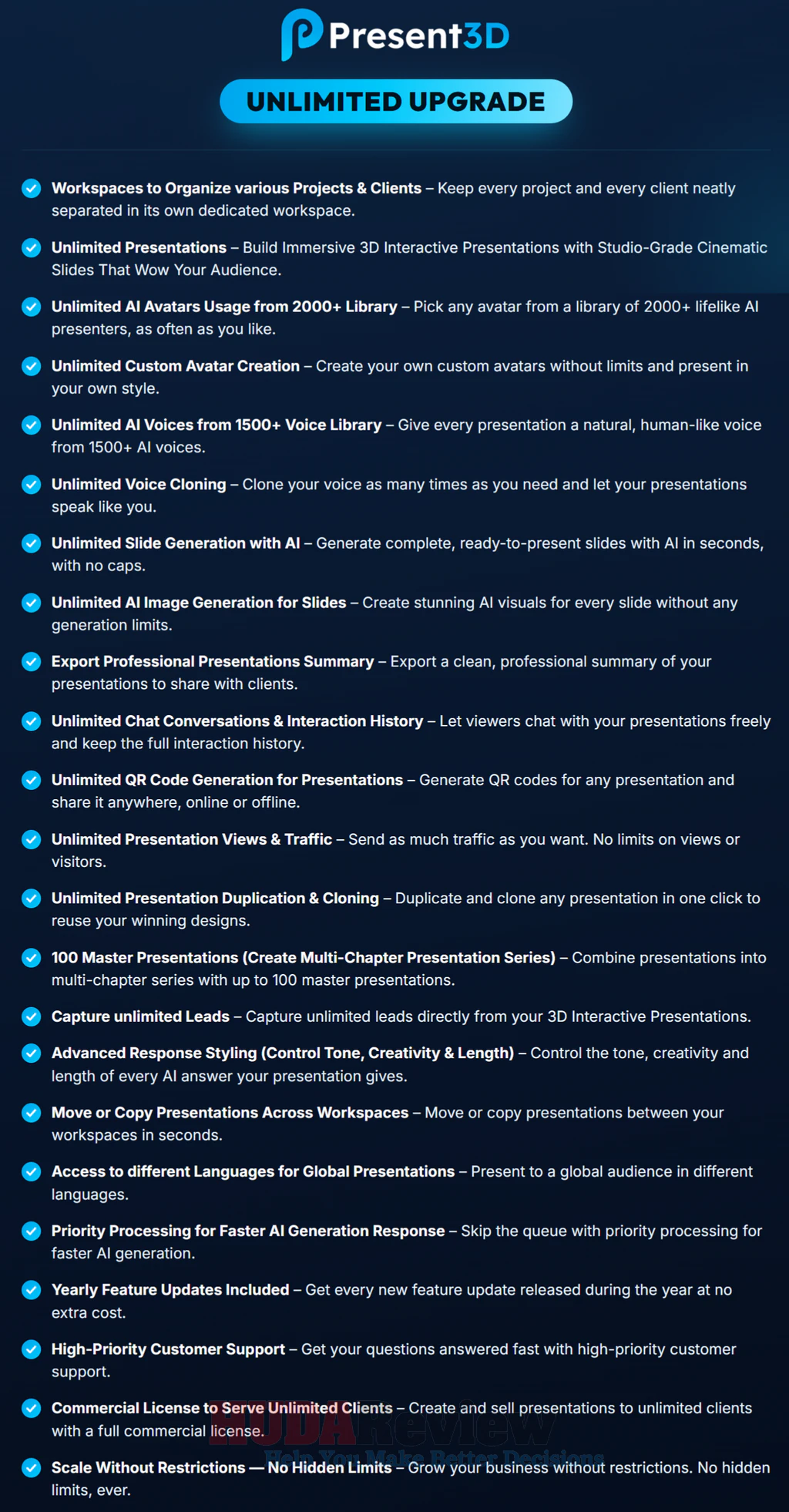
This upgrade unlocks unlimited presentation creation, workspaces, AI-generated slides, avatar customization, voice cloning, and more, making it ideal for creators managing multiple projects or clients.
Here’s what you’ll unlock with this upgrade:
OTO 2: Present3D Enterprise Edition
Price: $97 (one-time payment)
>>>Click Here To Access This OTO
Turn Present 3D into a more powerful business communication and sales platform.
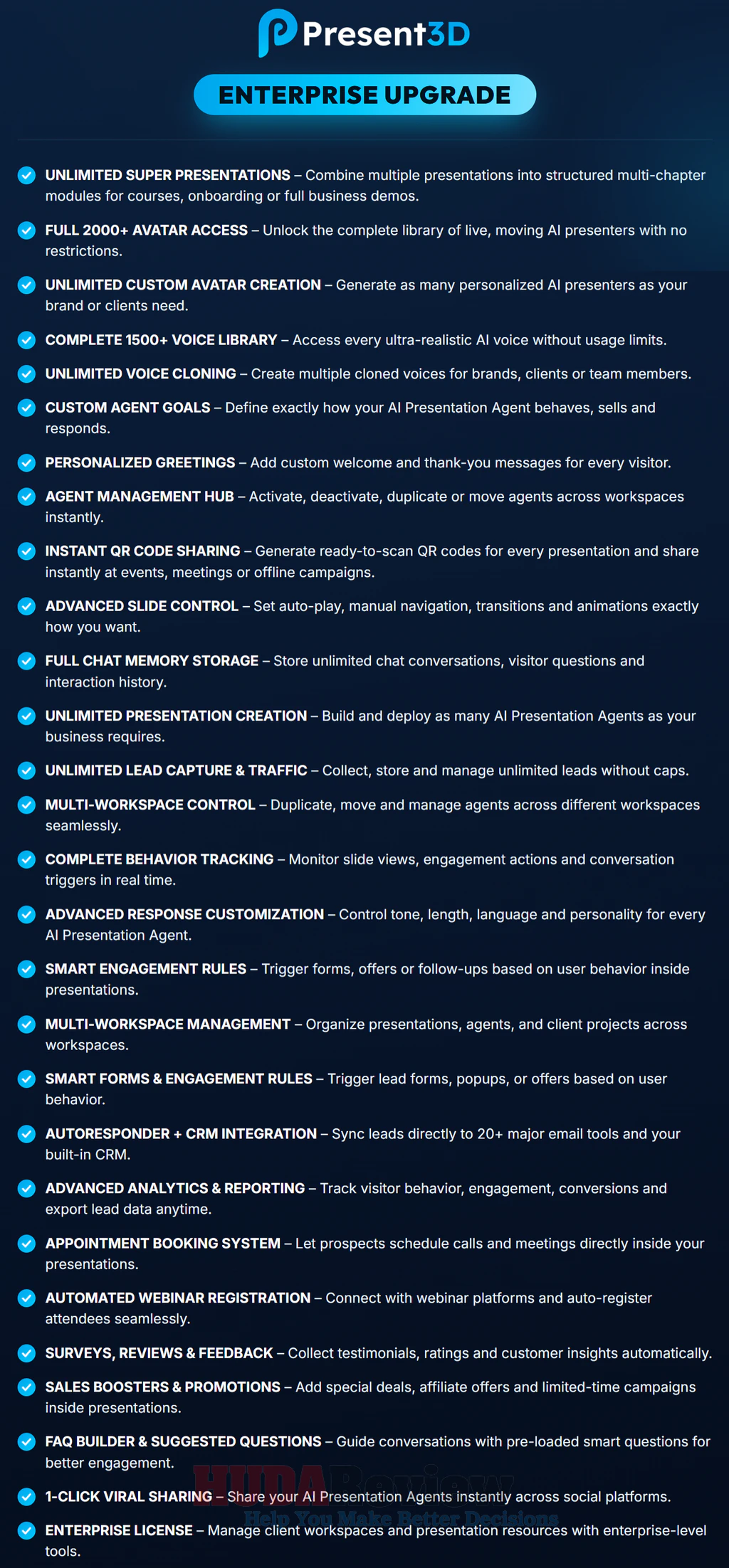
The Enterprise upgrade adds advanced AI agent controls, smarter engagement tools, appointment booking, autoresponder integrations, detailed analytics, and enhanced lead management capabilities.
Here’s a closer look at everything included:
OTO 3: Present3D Automation Edition
Price: $97 (one-time payment)
>>>Click Here To Access This OTO
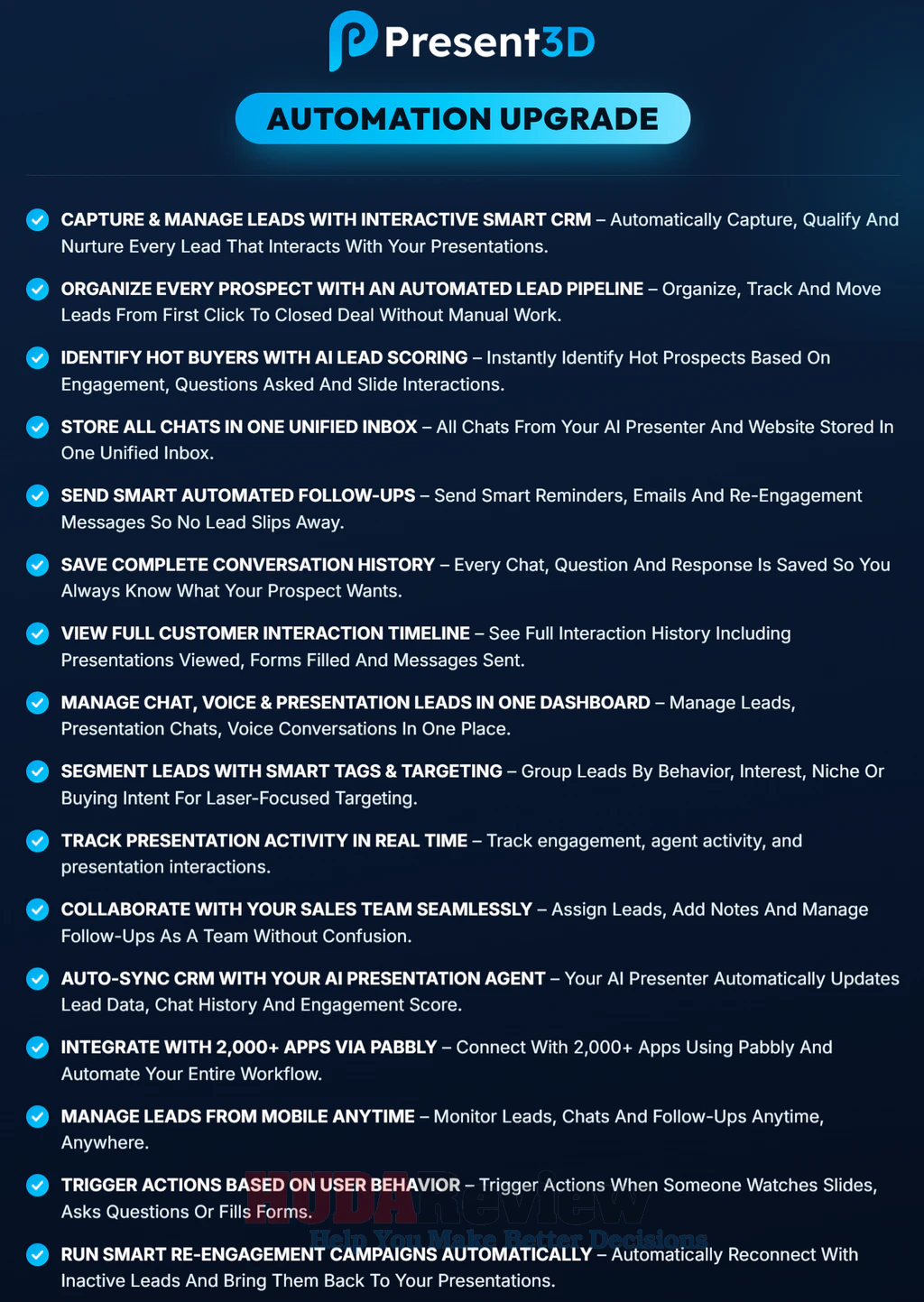
Put your lead management and follow-ups on autopilot. This upgrade provides an advanced AI-powered CRM with automated lead tracking, smart lead scoring, follow-up sequences, conversation management, and behavior-based automation to help you manage prospects more efficiently.
Here’s what this upgrade brings to your workflow:
OTO 4: Present3D – Agency Unlimited License Edition
Price: $97 (one-time payment)
>>>Click Here To Access This OTO
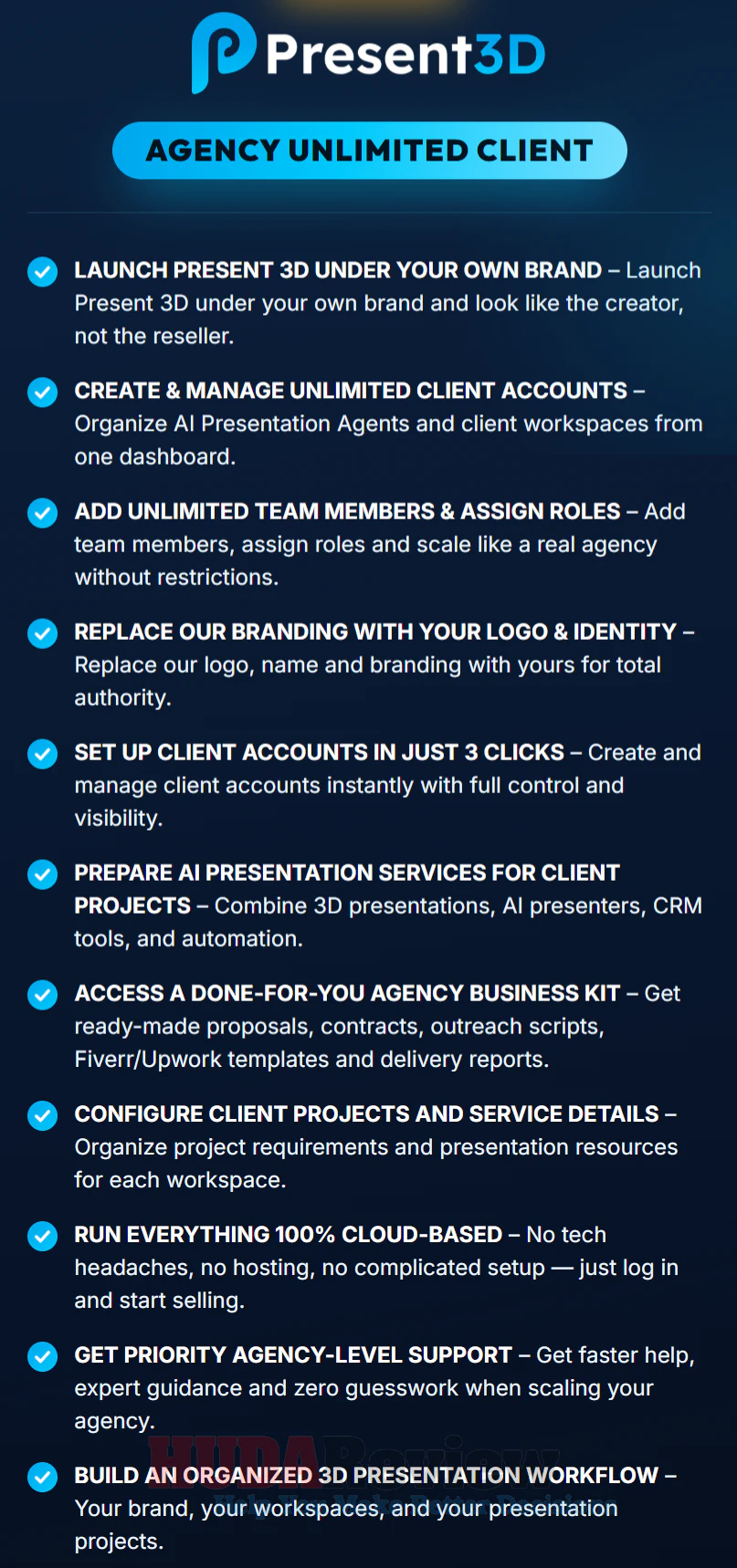
Build and grow your own AI presentation service under your brand. This upgrade includes white-label branding, unlimited client accounts, team access, and ready-made agency resources, allowing you to sell customized AI presentation solutions and manage multiple clients professionally.
Here’s what’s included in the Agency package:
OTO 5: Present3D – Done With You Edition
Price: $147 (one-time payment)
>>>Click Here To Access This OTO
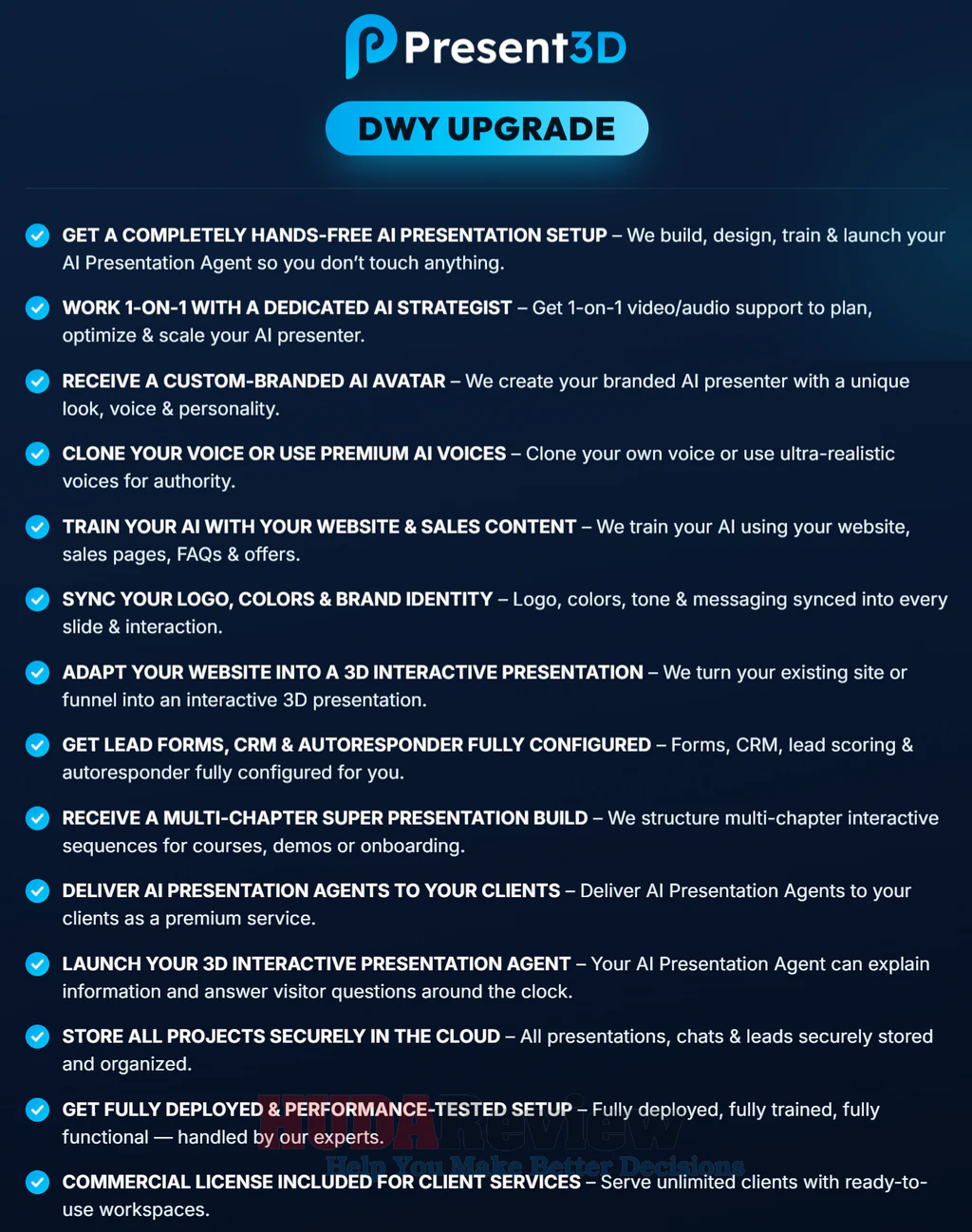
Get expert help building and launching your AI presentation system. The Present 3D team helps you with setup, avatar customization, branding, content training, CRM configuration, and deployment, making this upgrade suitable for users who prefer a professionally prepared solution.
Here’s what you’ll receive with this upgrade:
Should You Become a Present 3D User?
Present 3D is a great fit for:
- Digital marketers and affiliate marketers: Create interactive product showcases, sales presentations, and promotional content that encourages conversions.
- Small business owners: Present products and services professionally, engage visitors, and capture potential leads.
- Freelancers and agencies: Sell customized 3D presentations, AI presenters, and lead generation solutions to clients.
- Coaches, consultants, and educators: Create interactive training materials, courses, and presentations that explain complex topics clearly.
- Real estate agents and sales professionals: Showcase properties, deliver engaging sales pitches, and answer customer questions through AI presenters.
- Beginners looking to make money online: Start offering AI-powered presentation services without advanced design or technical skills.
It may not be the ideal choice for:
- Users who only need basic slides: Those satisfied with simple, static PowerPoint presentations.
- People looking for traditional video editing software: Those primarily interested in editing movies, short videos, or complex animations.
- Users who prefer fully manual design: Those who want complete control over every element without relying on AI assistance.
What I Like About Present 3D and What to Keep in Mind
PROS:
- Beginner-friendly: Easy to get started without previous design or technical experience.
- Saves valuable time: Cuts down hours of presentation planning, writing, and designing.
- Professional-looking results: Helps you create impressive presentations that make your brand stand out.
- Better audience engagement: Makes your content more interesting and enjoyable to explore.
- More effective sales communication: Helps explain offers clearly and address potential customer concerns.
- Works around the clock: Keeps your presentations available to prospects even when you’re offline.
- Great for lead generation: Helps turn interested viewers into potential customers.
- Supports global marketing: Makes it easier to communicate with audiences in different languages.
- Versatile business applications: Suitable for sales, marketing, education, consulting, and client projects.
- Flexible sharing options: Makes it convenient to reach audiences across websites and marketing channels.
- Reduces outsourcing costs: Handles work that might otherwise require designers or presenters.
- Strong commercial potential: Gives freelancers opportunities to sell valuable AI presentation services.
- Room to grow: Offers additional tools for users who want to expand their marketing or agency operations.
CONS:
- AI-generated content may need adjustments: Reviewing the presentation’s wording, visuals, and branding helps produce the best results.
Is Present 3D Worth Getting? My Conclusion
If you’re looking for a practical way to create professional 3D presentations, engage potential customers, and build new income streams, Present 3D is a highly recommended option.
Its simple workflow, interactive AI features, and commercial usage options make it an attractive choice for beginners and experienced marketers alike. The current pricing offers good value, while the Bundle adds tools for those who want to expand further.
Thank you for reading my review. I hope it helps you make the right decision, and I wish you great results with Present 3D!
10 Common Questions Answered
❓ Can I control how my presentation plays?
Yes. You can choose automatic slide transitions or manual navigation and adjust slide behavior to suit your audience.
❓ Can I use my own branding in presentations?
Absolutely. You can customize colors, logos, text, images, and layouts to match your business or personal brand.
❓ Can I add subtitles to my AI presentations?
Yes. You can enable subtitles to make your presentations easier to follow, especially for viewers who prefer watching without sound.
❓ Can visitors leave feedback on my presentations?
Yes. You can collect feedback from viewers and display customized thank-you messages to encourage further engagement.
❓ Can a real person take over an AI conversation?
Yes. The platform includes live chat capabilities, allowing human agents to assist visitors when they need personal attention.
❓ Can I connect my presentations to email marketing tools?
Yes. The Enterprise upgrade supports integrations with 20+ popular autoresponders, helping you manage leads and email follow-ups.
❓ Can customers book appointments through my presentations?
Yes. The Enterprise upgrade includes appointment booking functionality, allowing interested prospects to schedule calls or meetings.
❓ Can I manage presentations for different brands or clients?
Yes. The Unlimited upgrade provides separate workspaces to organize presentations, branding, and projects for multiple clients.
❓ Does Present 3D provide training and customer support?
Yes. Your purchase includes step-by-step video training and customer support, making it easier to learn the software and get assistance.
❓ What does lifetime access actually mean?
Lifetime access refers to the product’s operational lifetime, rather than your personal lifetime. The vendor estimates approximately five years as the typical support lifespan for this type of product.